


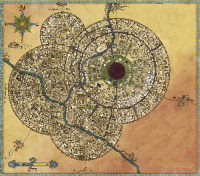
Hi, I feel like this has probably been brought up before but I really can't find it with google: I'm uploading jpegs to the map layer, and they pop up grey/low contrast. Here's an example: Image #1 is the map that I uploaded, viewed on my desktop, so you can see the difference. image #2, on the left is my map image, it's all grey, as you can see. Right next to it is a map bought from the Marketplace, as you can see it's fine with full colour/contrast. Things I've tried: - Turning off dynamic lighting. That wasn't the problem anyway, since the desert image from Marketplace looks fine - Checking that it's on the correct layer - Messing with image tint - Messing with GM Darkness Opacity, GM info overlay etc. - Viewing as a player. Still looks the same Would it be to do with my jpeg properties? I think Illustrator exported a CMYK jpeg, though I'm not an expert on that kind of thing. Or would it be something else? No wrong answers! Thanks a bunch in advance!! -Josh

